
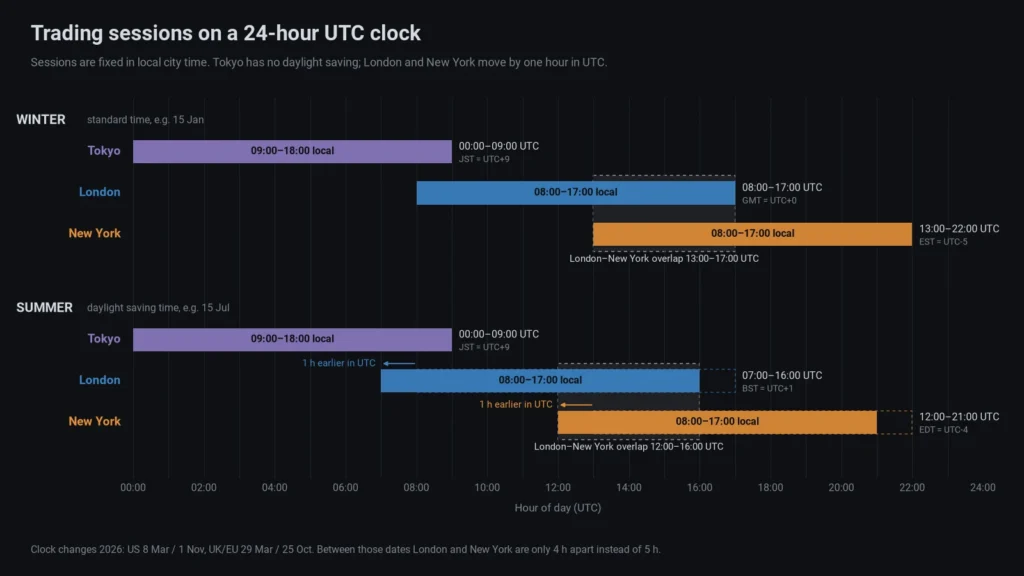
Short answer: in UTC, the Tokyo session runs 00:00–09:00 all year. London runs 08:00–17:00 UTC in winter and 07:00–16:00 UTC in summer. New York runs 13:00–22:00 UTC in winter and 12:00–21:00 UTC in summer. The London–New York overlap lasts four hours: 13:00–17:00 UTC in winter, 12:00–16:00 UTC in summer. For a few weeks in March and around the end of October, the US and Europe are on different clocks and these times shift by an hour.
Those numbers assume the usual working hours in each city: 09:00–18:00 in Tokyo, 08:00–17:00 in London and New York. Forex has no official opening bell, so other sources draw the sessions a little earlier or later. What matters is that you define them in local city time and let daylight saving do the rest. That is what this guide does.
Session hours in local time
Every session starts and ends at a fixed clock time in its own city. The UTC times move because two of the three cities change their clocks.
| Session | Local hours | Time zone | Daylight saving |
|---|---|---|---|
| Tokyo | 09:00–18:00 | JST, UTC+9 | None |
| London | 08:00–17:00 | GMT, UTC+0 in winter; BST, UTC+1 in summer | Last Sunday of March to last Sunday of October, switching at 01:00 UTC |
| New York | 08:00–17:00 | EST, UTC−5 in winter; EDT, UTC−4 in summer | Second Sunday of March to first Sunday of November, switching at 02:00 local time |
Forex session times in UTC: winter and summer
We converted the local hours with Python’s zoneinfo module, which uses the IANA time zone database (Asia/Tokyo, Europe/London, America/New_York). The third column covers the weeks when only the US has changed its clocks.
| Session (UTC) | Winter: both on standard time | Summer: both on daylight time | Gap weeks: US on daylight time, UK on GMT |
|---|---|---|---|
| Tokyo | 00:00–09:00 | 00:00–09:00 | 00:00–09:00 |
| London | 08:00–17:00 | 07:00–16:00 | 08:00–17:00 |
| New York | 13:00–22:00 | 12:00–21:00 | 12:00–21:00 |
| London–New York overlap | 13:00–17:00 (4 h) | 12:00–16:00 (4 h) | 12:00–17:00 (5 h) |
| Tokyo–London overlap | 08:00–09:00 (1 h) | 07:00–09:00 (2 h) | 08:00–09:00 (1 h) |
The clock changes for the next two years:
- 2026: US clocks go forward on Sunday 8 March, UK and EU clocks on Sunday 29 March. The UK and EU go back on Sunday 25 October, the US on Sunday 1 November.
- 2027: US forward on 14 March, UK and EU on 28 March. UK and EU back on 31 October, US on 7 November.
So in 2026 the spring gap lasted three weeks (8–29 March) and the autumn gap one week (25 October to 1 November). As this is written, on 29 October 2026, we are inside that autumn gap: New York opens at 12:00 UTC while London still runs 08:00–17:00 UTC, and the overlap is five hours instead of four.
The London–New York overlap
The overlap is the stretch when London and New York desks are working at the same time. US releases scheduled for the New York morning fall inside it; the monthly US Employment Situation report, for example, comes out at 08:30 New York time, which is 13:30 UTC in winter and 12:30 UTC in summer. If you trade intraday, know where the overlap sits in your own time zone before you plan the day, and know which releases are due in it.
The Tokyo–London overlap is much shorter: one hour in winter, two in summer. Tokyo’s local hours never move, so only London’s side of the overlap changes.
Why session ranges matter
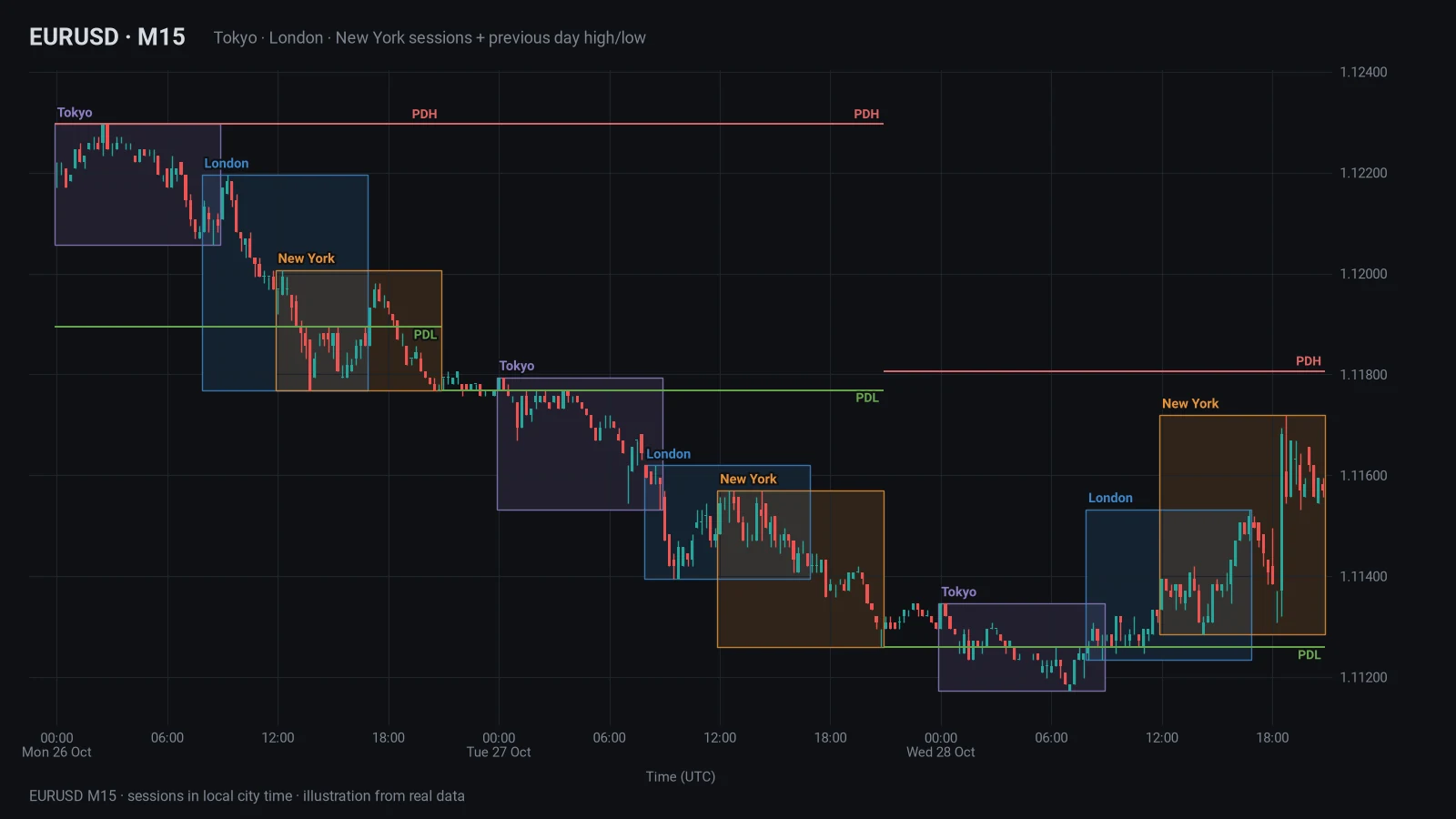
A session box is a summary: from this time to that time, price traded between this high and this low. That sounds trivial, but it answers questions you would otherwise eyeball:
- How much did the Asian hours move? Compare the Tokyo box on EURUSD or GBPUSD with the London box of the same day. A tight Asian range tells you the market has not committed yet.
- Did London leave the Asian range, and on which side? Traders watch whether the London session trades beyond the Tokyo high or low and whether price comes back inside.
- Is today wide or narrow compared with recent days? Five session boxes side by side show at a glance whether today’s ranges are unusual.
- Where did a session close relative to its own range? A session that ends near its high reads differently from one that ends in the middle.
None of this is a trade signal. A range shows where the market has been; the box is a reference, not a plan.
What our own test showed about the Asian range
Two rules come up again and again: “a tight Asian range sets up a big London breakout” and “follow London when it breaks the Asian range”. We tested both on hourly data for 10 major FX pairs from 2017 to 2026. The rules were fixed before the run, sessions were placed in local city time with daylight saving, costs were 0.7 to 2 pips per trade depending on the pair, a placebo range of the same length served as a control, and everything from 2023 onwards was kept back as an untouched test period.
- Following the London breakout of the Asian range did not survive costs. In the test period it lost about half a basis point per trade after costs, and the placebo range did slightly better than the real Asian range.
- A tight Asian range was not followed by a bigger day. It was the other way round: after the quietest fifth of Asian sessions, the London and New York hours moved about 0.84 to 0.97 times their 20-day median range; after the busiest fifth, about 1.10 to 1.46 times. Quiet tends to follow quiet.
- A break of the Asian range on its own tells you little. London and New York traded beyond the Asian high or low on 94 to 99.8% of days, and beyond both sides on 20 to 50% of days.
This is one test on one data set, not a law of the market. It is a good reason to use session boxes as context for how much a day may move, not as a signal on their own.
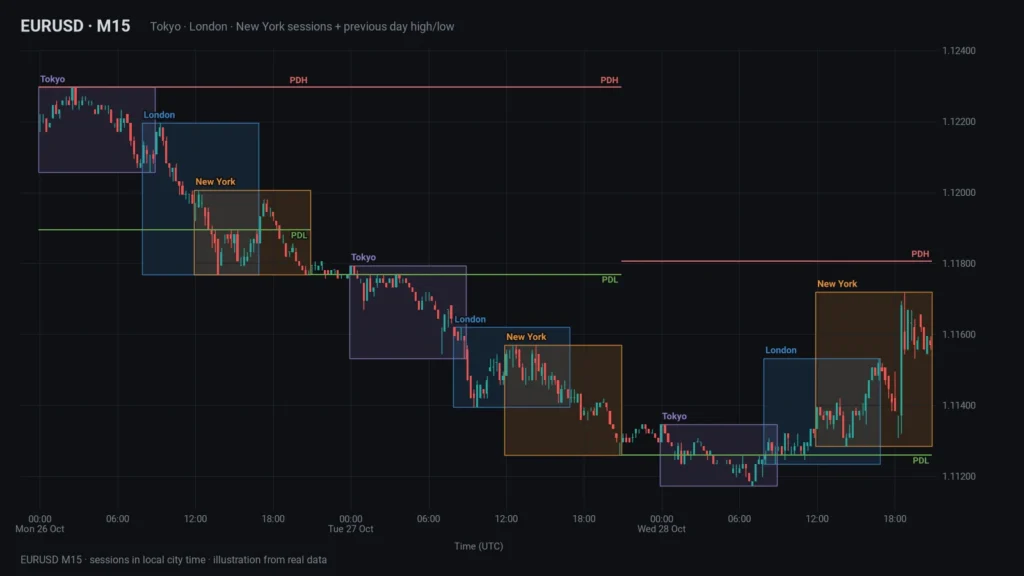
Session highs and lows vs previous day high and low
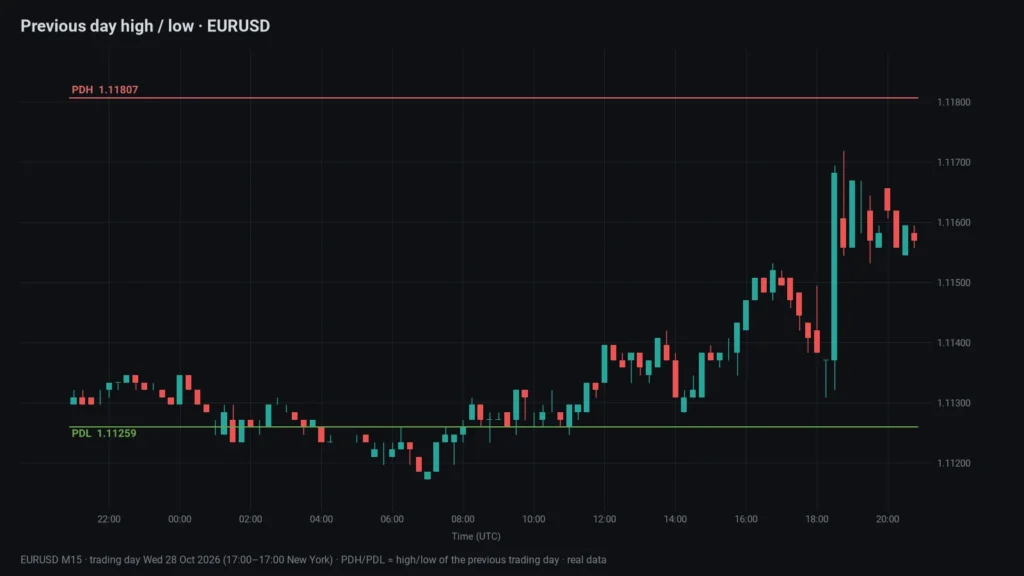
The previous day high (PDH) and previous day low (PDL) are the extremes of the last completed trading day. They are popular for one simple reason: almost everyone can see them. Levels that many traders reference are where stops and targets are commonly placed, so the way price behaves around them is worth watching.
Typical ways traders use them, as context and not as entries:
- Is today trading inside yesterday’s range or extending beyond it?
- Did a session high or low form just short of PDH or PDL, or did price run through it?
- How far is the current price from either level compared with an average day’s range?
One detail trips people up: “yesterday” depends on where the daily candle starts. Depending on platform and data feed, the forex day can end at 17:00 New York time, at midnight UTC or, in MetaTrader, at midnight on the broker’s server clock. Two platforms can therefore show different PDH and PDL values for the same pair. Use the day your broker uses, and do not mix levels from different sources.
Common mistakes with session times
- Reading sessions in broker server time without knowing the offset. In MetaTrader 5 the time axis of every chart shows the trade server’s time, and the broker chooses that clock. A box drawn at “08:00” on the chart is not London’s 08:00 unless your server happens to run on UK time.
- Using fixed UTC offsets. If you set New York to UTC−5, your box is right in winter and one hour late for most of the year. TradingView’s own help makes the same point for its sessions indicator: fixed GMT offsets do not follow daylight saving, IANA names such as America/New_York do.
- Forgetting the gap weeks. Late March and late October to early November are when the US and Europe disagree. Tools that shift all sessions on one date get one of the two cities wrong for those weeks.
- Assuming Tokyo moves too. Japan does not use daylight saving. Tokyo’s UTC hours stay the same all year; only its overlap with London changes.
- Using session boxes on H4 or daily charts. A nine-hour session on an H4 chart covers two or three candles. Session boxes belong on intraday timeframes, H1 and below.
How to mark sessions in cTrader, MT5 and TradingView
cTrader
cTrader shows the currently open market sessions in a Trading sessions field in the lower-left corner of the window. That tells you what is open now but draws nothing on the chart. You can change the time zone of charts and trade details with the User time offset: click the current time at the bottom right and pick an offset. Setting it to UTC+0 makes the table above directly readable on your chart. Period separators in the chart viewing options add vertical lines between periods.
For boxes you have two options: draw rectangles by hand every day, or load an indicator. If you have not installed a custom indicator before, our guide on installing an .algo file in cTrader walks through it, and the cTrader indicators page lists what we offer.
MetaTrader 5
The closest built-in aid in MT5 is Show period separators in the chart properties. It draws vertical lines at the borders of the larger period, daily lines on M1 to H1 charts. Those lines follow server time, so they mark the broker’s day, not London’s or New York’s.
For session boxes you need an indicator, and it has to know your broker’s offset to UTC, including how that offset changes during the year. Check the server time shown in the title of the Market Watch window against UTC before you trust any session tool.
TradingView
TradingView has a built-in Trading Sessions indicator. It draws a coloured box around the bars of up to three sessions, works only on intraday timeframes, and lets you set a time zone per session. Use IANA names such as Europe/London so daylight saving is handled; if you leave the field empty, it uses the exchange time zone of the symbol. Your chart’s own time zone is set under Timezone in the Symbol tab of the chart settings, or by clicking the time below the chart.
ASX Sessions: a free session indicator for all three platforms
We built ASX Sessions because we wanted the same session boxes on every platform we use, with daylight saving handled properly. It is free and open source, with no license key. It is a charting aid and gives no signals.
What it draws:
- Session boxes for Tokyo, London and New York, from session start to session end (or to the current bar while a session runs), spanning the session’s high and low, with a small name label. A dotted midline is optional.
- PDH and PDL lines for the current trading day, taken from the completed previous daily candle of the chart symbol, so they do not repaint.
- Only the last few days (5 by default, up to 30) to keep charts fast. Sessions are hidden above H1 by default.
Session hours are inputs in each city’s local time, with this article’s defaults. Daylight saving is applied per bar date, so the gap weeks come out right:
- cTrader: works in UTC internally and applies the US and UK/EU rules in code. Your User time offset only changes how the chart is displayed. ASX Sessions for cTrader
- MetaTrader 5: converts server time to UTC with an offset you can detect automatically or enter by hand, plus a choice of how your broker’s server changes its clock (US dates, EU dates or never). ASX Sessions for MT5
- TradingView: uses the IANA time zones natively, so daylight saving comes from TradingView itself. ASX Sessions for TradingView
If you are deciding which platform to chart on in the first place, our cTrader vs TradingView comparison covers the differences. Paid tools for cTrader are in the marketplace.
Trading forex and CFDs with leverage can lose you money quickly, and session levels describe where price has been, not where it will go.
FAQ
What time does the London session open in UTC?
With London defined as 08:00–17:00 local time, it opens at 08:00 UTC in winter and 07:00 UTC while the UK is on British Summer Time, from the last Sunday of March to the last Sunday of October.
When do the London and New York sessions overlap?
From 13:00 to 17:00 UTC in winter and from 12:00 to 16:00 UTC in summer. In the weeks when the US has changed its clocks and the UK has not, the overlap runs 12:00–17:00 UTC, five hours instead of four.
Does the Tokyo session change with daylight saving?
No. Japan does not observe daylight saving, so Tokyo’s 09:00–18:00 is 00:00–09:00 UTC all year. What changes is how long it overlaps with London.
Why are my session boxes one hour off?
Usually one of three reasons: the tool uses a fixed UTC offset, it switches both cities on the same date and gets the gap weeks wrong, or (in MT5) it assumes the wrong broker server offset. Compare the chart’s time with UTC first, then check how the tool handles daylight saving.
Is the previous day high the same on every platform?
Not necessarily. PDH and PDL come from the daily candle, and where that candle starts depends on the platform and broker. Use the values from the platform you actually trade on.